
In stock

XPPen Deco 640 Drawing Tablet with 16K Pressure Levels, Portable Digital Art Pad with 8 Shortcut Keys for OSU!, Graphics Design, Distance Education, Signing, Works with Windows, macOS and Android

£29.99

BUY NOW
Category: Graphic Tablets

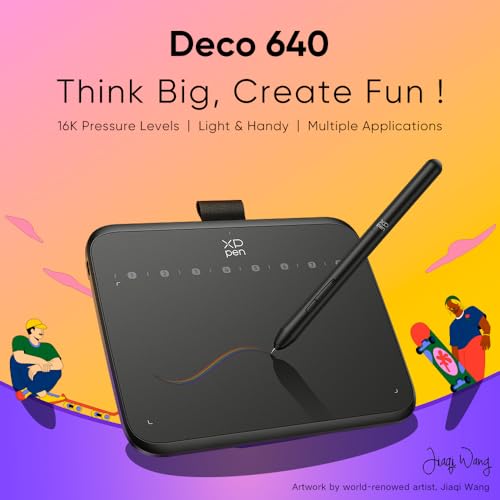
  • Unleash your creativity with the XP-PEN Deco 640 Drawing Tablet, a cutting-edge tool designed for artists of all levels. Featuring an impressive 16,384 pen pressure levels, this tablet ensures every stroke is captured with remarkable precision, making it feel as natural as drawing on paper. The 220 RPS report rate and 60° tilt support allows for seamless transitions between different drawing techniques, so you can express your artistic vision effortlessly.
  • With a generous drawing area of 16 cm x 9 cm and eight programmable shortcut keys, the Deco 640 offers the perfect blend of functionality and convenience. Whether you're sketching, illustrating, or retouching photos, this tablet empowers you to work efficiently and comfortably, allowing you to focus on what you do best—creating.
  • Lightweight and portable, the Deco 640 isn't just a drawing tablet; it's also your digital notebook. Ideal for jotting down notes in class or during meetings, it ensures you never miss an idea. Plus, its compact size makes it the perfect companion for gaming enthusiasts, especially for playing OSU!
  • Compatibility is key, and the Deco 640 excels here too. It's compatible with Windows 7 or above, macOS 10.13 or above, and Android 10.0 or above, supporting popular design software like Photoshop, Illustrator, and MediBang. Elevate your digital art experience and transform your ideas into stunning visuals with the XP-PEN Deco 640 Drawing Tablet—your gateway to unlimited creativity.

Read More

Frequently Asked Questions

Popular questions and answers about this product

What is the pressure sensitivity of the XP-PEN Deco 640?

The XP-PEN Deco 640 boasts an impressive 16,384 pen pressure levels, allowing for precise control over line thickness and opacity, making your drawings look more natural and detailed.

Is the Deco 640 suitable for beginners?

Absolutely! The Deco 640 is designed with beginners in mind, providing an intuitive experience with its lightweight, user-friendly features and programmable shortcut keys.

Can I use the Deco 640 for gaming?

Yes! The Deco 640 is an excellent choice for gaming, especially for popular rhythm games like OSU!, thanks to its high report rate and precision pressure levels.

What software is compatible with the XP-PEN Deco 640?

The Deco 640 works seamlessly with popular design software including Photoshop, Illustrator, SAI, and MediBang, making it a versatile tool for artists and designers.

How portable is the Deco 640 drawing tablet?

The Deco 640 is slim and lightweight, making it easy to carry around. It's perfect for students or professionals who want a digital notebook that they can use anywhere.

What devices can I connect the Deco 640 to?

The Deco 640 is compatible with Windows 7 or higher, macOS 10.13 or higher, and Android 10.0 or higher, ensuring it fits into your existing tech ecosystem seamlessly.