
In stock

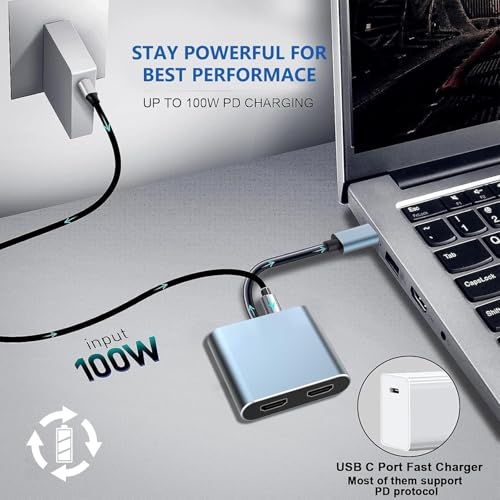
USB C to Dual HDMI Adapter, 4 in 1 HDTV Splitter for Du-al Monitors 4K, PD 100W,USB 2.0, Du-al HDMI A-dapter for 2 M-onitors HDTV Dual Monitor Adapter for iPad,MacBook Pro/Air, Dell, Chromebook

£12.99

BUY NOW
Category: USB Hubs

  • Introducing the Oliveria USB-C to Dual HDMI Adapter, your ultimate companion for multitasking and entertainment. With this sleek 4-in-1 HDTV splitter, you can effortlessly extend your Windows laptop’s display to two monitors, a TV, or a projector, achieving stunning resolutions of up to 4K at 60Hz using a single HDMI or 4K at 30Hz with dual HDMI outputs. Imagine the efficiency of working on multiple screens simultaneously, whether you're tackling a big project, enjoying a film, or giving a presentation.
  • This dual HDMI adapter is designed for plug-and-play convenience, making it compatible with a wide range of devices including MacBook Pro, MacBook Air, Dell XPS, and various USB-C smartphones like the Samsung Galaxy S9. Its advanced internal PCB design ensures minimal interference, so you won’t have to worry about Wi-Fi disruptions during your tasks.
  • Constructed with a durable aluminum shell, this adapter not only provides excellent heat dissipation but is also wear-resistant and anti-fingerprint, ensuring that it looks as good as it performs. Backward compatibility means it still works wonders with devices supporting 2K or 1080P at 60Hz, provided you use an HDMI 2.0 cable.
  • To optimise your setup, remember to connect your monitors first before linking to your laptop. Plus, with support for various operating systems, including Windows, Mac OS, and Linux, you’re equipped for any scenario. Don't miss out on the chance to elevate your workspace with this must-have accessory!

Read More

Frequently Asked Questions

Popular questions and answers about this product

What devices are compatible with the USB-C to Dual HDMI Adapter?

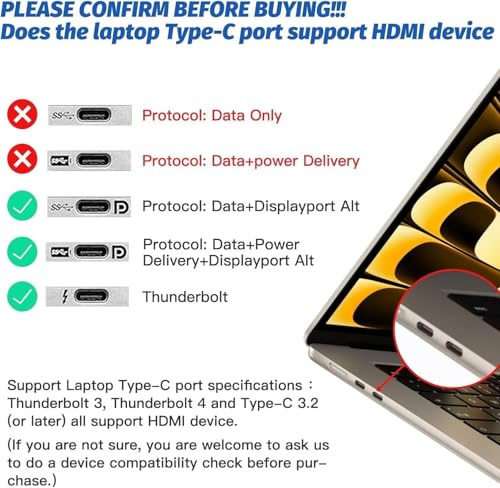
This adapter is compatible with a wide range of devices, including MacBook Pro/Air, Dell XPS, and various USB-C smartphones such as Samsung Galaxy S9. Ensure your device supports Display Port Alternate Mode.

What is the maximum resolution supported by the adapter?

The adapter supports up to 4K resolution at 60Hz using a single HDMI output and up to 4K at 30Hz when using dual HDMI outputs.

Do I need any special drivers to use this adapter?

No, the USB-C to HDMI adapter is designed for plug-and-play functionality, meaning no drivers are required for installation.

Can I use this adapter with a Mac device?

Yes, while it’s compatible with Mac devices, please note that due to macOS limitations, the display on the extended screens will mirror the primary screen.

Will this adapter affect my Wi-Fi connection?

No, this adapter features a specially designed internal PCB to minimise interference, ensuring that your Wi-Fi signal remains strong and uninterrupted.

How do I set up the adapter for dual monitors?

To set up, first connect your monitors to the HDMI ports on the adapter, then link the adapter to your laptop’s USB-C port. You may need to adjust your audio output settings in System Preferences.