In stock

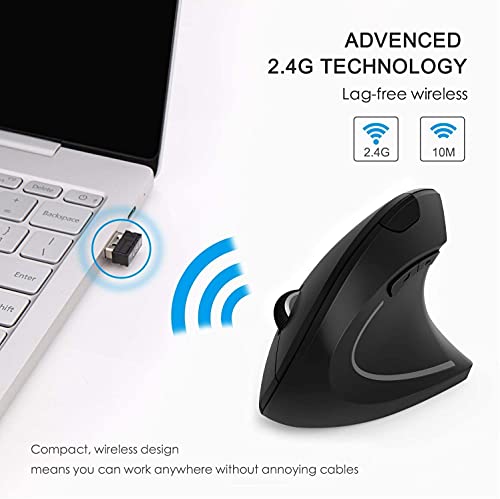
TriLine Wireless Ergonomic Vertical Mouse, 2.4G USB Cordless Right Hand 3 Adjustable 800-1200-1600 DPI 6 Buttons Optical Mice, for Laptop, PC, Desktop, Notebook Accessories, Black (Black)

£10.9

BUY NOW
Category: Mice

  • Introducing the TriLine Wireless Ergonomic Vertical Mouse—a game-changer for right-handed users seeking unparalleled comfort and control. Designed with the natural contours of your palm in mind, this mouse alleviates muscle strain and joint fatigue, making it perfect for prolonged use whether you're working from home, gaming, or simply browsing the web.
  • One of the standout features of the TriLine mouse is its impressive adjustable sensitivity, offering 800, 1200, and 1600 DPI settings. This means you can effortlessly switch between precision tasks and fast-paced scrolling with just a click, ensuring smooth tracking across various surfaces. Plus, with added forward and back buttons, navigating web pages has never been easier—ideal for internet surfers and professionals alike.
  • Setup is a breeze with the plug-and-play USB receiver located conveniently at the bottom of the mouse. Simply plug it into your laptop or desktop USB port, and you're ready to go—no drivers required! The TriLine mouse also boasts an eco-friendly auto-sleep function, conserving battery life by entering sleep mode after 8 minutes of inactivity. A quick click of either button wakes it up, ensuring you’re always ready to work or play.
  • With its sleek black design, this wireless mouse not only enhances your productivity but also complements your workspace aesthetically. Plus, being Prime eligible means you can enjoy fast delivery right to your door!
  • Experience the perfect blend of style, comfort, and functionality with the TriLine Wireless Ergonomic Vertical Mouse—a must-have accessory for anyone serious about their computing experience!

Read More

Frequently Asked Questions

Popular questions and answers about this product

What is the ergonomic design feature of the TriLine mouse?

The TriLine mouse is specifically crafted for right-handed users, fitting the natural contour of your palm to maximise comfort during extended use. This design helps reduce muscle strain and joint pain.

How do I set up the TriLine Wireless Mouse?

Setting up the TriLine mouse is incredibly simple. Just plug the USB receiver located at the bottom into your device’s USB port, and you're good to go—no additional drivers needed!

What are the DPI settings available on this mouse?

The TriLine mouse features adjustable DPI settings of 800, 1200, and 1600. This allows for smooth tracking and precision, making it versatile for both work and gaming scenarios.

Does the mouse have any special features for web browsing?

Yes! The mouse includes convenient forward and back buttons, making it easier to navigate through web pages without having to use your keyboard.

How does the auto-sleep function work?

The TriLine mouse automatically enters sleep mode after 8 minutes of inactivity to conserve battery power. To wake it up, simply press either the left or right button.

Is this mouse compatible with all devices?

Yes, the TriLine Wireless Ergonomic Vertical Mouse is designed to work seamlessly with laptops, PCs, and desktops, making it a versatile accessory for any computer setup.