Mini DIY Smart Phone Projector, Portable DIY Home Theater Mobile Phone Pico Projector, for Home Media Video Player HD Wall Theater, No Larger Than 14.5 * 8 cm (Maximum Screen Size 5.8 inches)
£11.58
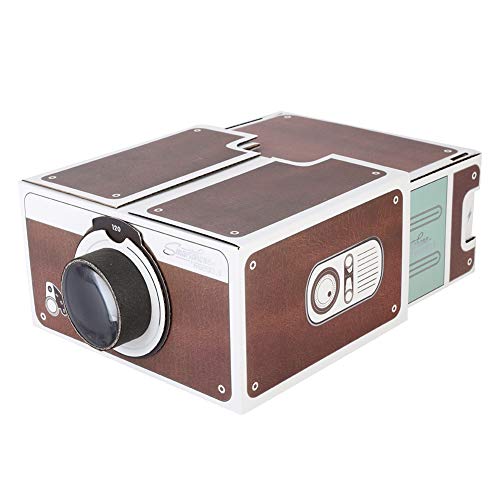
- Introducing the Lazmin Mini DIY Smartphone Projector, your ultimate portable home theatre solution! This innovative micro-projector transforms your smartphone into a captivating cinema experience right in your living room. Simply install the projection lens, and you’re ready to project your favourite videos and movies onto any wall, magnifying the image up to 8 times. Imagine hosting movie nights or binge-watching your favourite series with friends and family, all from the comfort of your home!
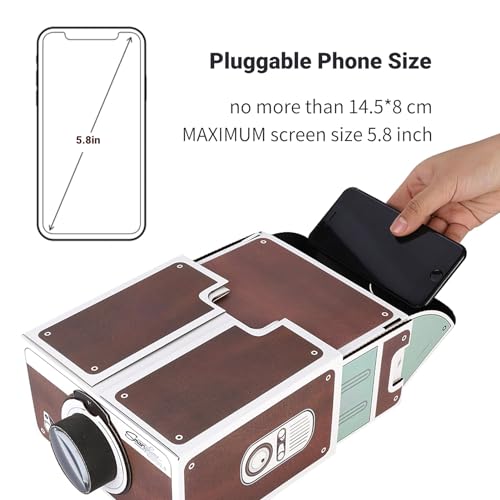
- Designed for convenience, the Lazmin Mini Projector accommodates smartphones with dimensions no larger than 14.5 x 8 cm (maximum screen size of 5.8 inches). Just insert your iOS or Android device, and you’re set for an unforgettable viewing experience. For optimal results, project onto white walls in darker environments to enjoy clearer images. While it’s essential to note that the projector acts as a simple DIY entertainment device, it offers a fun and creative way to enjoy media in a unique format.
- Keep in mind that the projected images are reversed, adding an element of intrigue to your viewing. For seamless adjustments, users can flip their phone or use apps for Android devices to control the image orientation. Embrace the joy of DIY with this engaging product that sparks creativity and provides a delightful cinematic experience. Don't miss out on this opportunity to elevate your home entertainment; grab your Lazmin Mini DIY Smartphone Projector today!
Frequently Asked Questions
Popular questions and answers about this product
What devices are compatible with the Lazmin Mini DIY Projector?
The projector works with smartphones no larger than 14.5 x 8 cm (maximum screen size of 5.8 inches), including both iOS and Android devices.
How do I set up the projector?
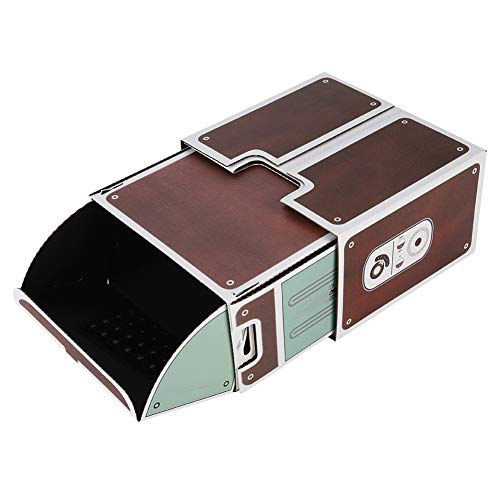
Simply install the projection lens, insert your smartphone, and adjust it for the best viewing angle. It's that easy!
Is the image quality good for watching movies?
Yes! The projector magnifies images up to 8 times, providing a fun way to watch videos. For the best results, project onto white walls in a dimly lit room.
Can I use this projector for presentations?
This projector is primarily designed for entertainment. However, it can be used for casual presentations if the content is suitable.
How do I adjust the orientation of the projected image?
If the image is upside down, simply flip your phone. For Android, you can download the "Ultimate Rotation Control" app to adjust image orientation easily.
Is the projector easy to assemble?
Absolutely! The product comes with an installation-free projection box and a magnifying lens, making assembly quick and hassle-free.


![for iPhone USB C Fast Charger Plug and Cable [MFi Certified] 2Pack 20W Power Adapter with 6FT Cable for iPhone 14/13/12/11 Pro/Pro Max/XS Max/XS/XR/X/SE/8 for iPhone USB C Fast Charger Plug and Cable [MFi Certified] 2Pack 20W Power Adapter with 6FT Cable for iPhone 14/13/12/11 Pro/Pro Max/XS Max/XS/XR/X/SE/8](https://m.media-amazon.com/images/I/41jwoaH2QpL._SL500_.jpg)

![for iPhone Charger [MFi Certified] 2Pack 20W PD USB C Power Adapter with 2Pack Fast Charging Cabe, USB C PD Wall Charger Plug and 6/6FT iPhone Charger Cable Compatible iPhone14 13 12 11 Pro/Pro Max for iPhone Charger [MFi Certified] 2Pack 20W PD USB C Power Adapter with 2Pack Fast Charging Cabe, USB C PD Wall Charger Plug and 6/6FT iPhone Charger Cable Compatible iPhone14 13 12 11 Pro/Pro Max](https://m.media-amazon.com/images/I/41AX0Br2+-L._SL500_.jpg)
![20W Fast Charger Plug With 3.3 feet Cable [Apple MFi Certified] for iPhone Charger 14 Plus/14 Pro/14 Pro Max/13/13 Pro/13 Pro Max/12/12 Pro/iPad, PD Charging Plug 20W Fast Charger Plug With 3.3 feet Cable [Apple MFi Certified] for iPhone Charger 14 Plus/14 Pro/14 Pro Max/13/13 Pro/13 Pro Max/12/12 Pro/iPad, PD Charging Plug](https://m.media-amazon.com/images/I/31VyHDJlZmL._SL500_.jpg)