
In stock

Stylus Pen for iPad 2018-2025 i-Pad 9th&10th&11th Gen,Milikilo Stylus Pen with Pencil Holder,Palm Rejection,for iPads Air11&13"(M2/M3),iPad Pro 11"&13"(M4),i-Pad 6th-10th,iPads Air 3/4/5,Mini 5/6

£13.99

BUY NOW
Category: Stylus Pens

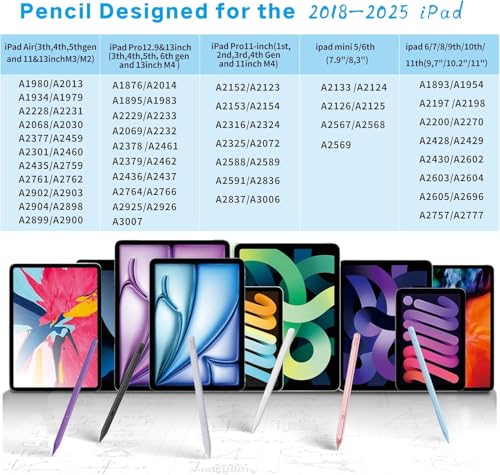
  • Discover the Milikilo Stylus Pen for iPad, your perfect companion for creative expression and productivity! This advanced stylus features a 0.9mm POM tip, ensuring unparalleled precision and sensitivity, making it feel just like a traditional pencil. Say goodbye to lag, skips, and scratches—this stylus provides a seamless drawing and writing experience on your iPad Air 13” (M3, 2025) or any compatible model from 2018 to 2025.
  • One standout feature is the palm rejection technology, allowing you to rest your hand comfortably on the screen without interference. Coupled with tilt sensitivity, you can effortlessly create varying strokes of thickness and depth, perfect for intricate artwork or dynamic note-taking.
  • Additionally, the Milikilo Stylus Pen comes with a thoughtful pencil holder that securely keeps your stylus in place and an innovative one-piece dust plug to prevent loss. With a rapid Type-C charging port, you’ll enjoy up to 10 hours of uninterrupted use after just 40 minutes of charging. The LED indicators make it easy to see your battery status at a glance.
  • This stylus pen is not only user-friendly—requiring no apps or Bluetooth connections—but also lightweight at just 0.42 ounces, making it an excellent gift for children and adults alike. Whether for learning, drawing, or jotting down notes, the Milikilo Stylus Pen is a fantastic alternative to pricier options. Grab yours today and elevate your iPad experience!

Read More

Frequently Asked Questions

Popular questions and answers about this product

What devices is the Milikilo Stylus Pen compatible with?

The Milikilo Stylus Pen is compatible with various iPad models from 2018 to 2025, including iPad 9th, 10th, and 11th generations, as well as iPad Air 11” and 13” (M2/M3).

How does palm rejection technology work?

The palm rejection feature allows you to rest your hand on the iPad screen while using the stylus, preventing accidental touches and ensuring a smooth writing or drawing experience.

How long does it take to charge the stylus?

The Milikilo Stylus Pen can be fully charged in just 40 minutes and provides up to 10 hours of usage time, making it perfect for long creative sessions.

Do I need to install an app to use the stylus?

No, the Milikilo Stylus Pen is easy to use and does not require any apps or Bluetooth connections. Simply press the button to turn it on or off.

Can children use this stylus pen?

Yes! Weighing only 0.42 ounces, the Milikilo Stylus Pen is lightweight and easy to handle, making it perfect for children learning to draw, write, or take notes.

What makes this stylus different from others?

The Milikilo Stylus Pen stands out with its precision POM tip, innovative palm rejection, tilt sensitivity, and a secure pencil holder, all at an affordable price.