
In stock

LAMA Wireless Keyboard With Touchpad and Mouse, Portable Bluetooth Ultra Slim Mini Keyboard for iPad/Tablet/iOS/Android/Windows/Laptop/Computer/Phone

£25.99

BUY NOW
Category: Keyboards

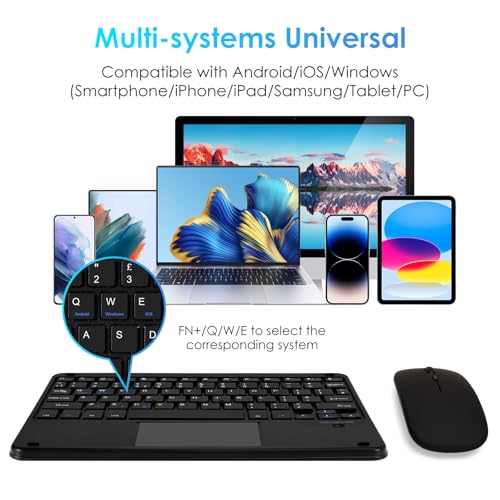
  • Introducing the LAMA Wireless Touchpad Keyboard - your ultimate companion for seamless typing across all your devices! This ultra-slim, portable Bluetooth keyboard is compatible with a wide array of wireless-enabled devices, including iPads, tablets, laptops, and smartphones. Whether you’re using the latest iPad models like the 10.2-inch or iPad Pro 12.9-inch, or Android devices like Samsung tablets, the LAMA keyboard ensures a smooth typing experience. (Please note: Windows 8 is not supported.)
  • What sets the LAMA keyboard apart is its impressive seven-colour backlighting with adjustable brightness levels, perfect for working in dimly lit environments. The innovative touchpad adds functionality, allowing you to navigate easily without needing a mouse. With its lightweight and compact design, weighing only 255g, it fits effortlessly into your bag, making it ideal for professionals on the go or students needing a portable solution.
  • You’ll enjoy extended usage with the built-in lithium-ion battery, providing up to 30 days of continuous use on a full charge! Plus, it features an energy-saving mode that automatically sleeps when not in use, helping to prolong battery life.
  • Designed for efficiency, the LAMA keyboard includes 13 multi-function keys and a smooth scissor feet structure for quick rebounds, enhancing your productivity. Whether you’re typing up documents, sending emails, or enjoying gaming sessions, this keyboard is your perfect partner for both work and play.
  • Make the smart choice today and elevate your typing experience with the LAMA Wireless Touchpad Keyboard!

Read More

Frequently Asked Questions

Popular questions and answers about this product

What devices is the LAMA keyboard compatible with?

The LAMA keyboard is compatible with iOS, Android, and Windows devices, including iPads, tablets, laptops, and smartphones, except Windows 8.

How do I activate the backlighting feature?

You can activate the seven-colour backlighting by pressing the "FN" key along with "Q," "W," or "E" to switch between the three modes easily.

How long does the battery last on a full charge?

The keyboard provides up to 30 days of continuous use on a full charge and has a standby time of 100 days.

What is the size and weight of the LAMA keyboard?

The keyboard measures 24.7x18x0.6cm (9.7x7.1x0.2in) and weighs only 255g (7.94oz), making it ultra-portable and easy to carry.

Do I need to set up the keyboard on my device?

Yes, for optimal performance, please set the hardware keyboard layout on your device after connecting the keyboard. Choose British for iOS and English (UK) for Android.

How do I charge the LAMA keyboard?

The keyboard comes with a USB-C cable for charging. It takes about 3-4 hours for a full charge.