
In stock

JUQITECH Backlit Keyboard Case for Samsung-Galaxy-Tab S8 S7 11 Case with 7 Color Backlit Wireless Detachable Keyboard for Galaxy Tab S8 SM-X700/X706 2022 S7 SM-T870/T875/T876 2020 11" Tablet Cover

£21.84£22.99

BUY NOW
Category: Keyboards

  • Introducing the JUQITECH Backlit Keyboard Case, the ultimate companion for your Samsung Galaxy Tab S8 and S7 (11-inch) tablets! This cleverly designed case is specifically tailored for the Samsung Galaxy Tab S8 (SM-X700/X706, 2022) and Tab S7 (SM-T870/T875/T876, 2020), ensuring a flawless fit. Before purchasing, simply check the model number in your tablet's settings to ensure compatibility.
  • The standout feature of this case is its waterproof, rechargeable backlit keyboard, which boasts seven vibrant colours, making typing a breeze even in low light. With a simple Bluetooth connection, you can easily detach or attach the keyboard, allowing you to switch seamlessly between typing and touch navigation. The U.S. chipset and scissor switch keys ensure a stable and fast typing experience, while the long-lasting lithium-ion battery means you can work or create anywhere, without worrying about power.
  • Crafted from soft PU and flexible TPU, this smart case offers full body protection, safeguarding your tablet against drops and scratches. The precise cutouts provide easy access to all features, while the magnetic auto sleep/wake function extends battery life, making it perfect for busy lifestyles.
  • Whether you're in a meeting, attending a class, or travelling, the JUQITECH Backlit Keyboard Case is your ideal partner for both work and play. It’s also a thoughtful gift for loved ones on special occasions, combining practicality with a touch of style. Elevate your tablet experience today!

Read More

Frequently Asked Questions

Popular questions and answers about this product

Is this keyboard compatible with tablets other than the Galaxy Tab S8/S7?

No, this keyboard case is specifically designed for the Samsung Galaxy Tab S8 (SM-X700/X706) and Tab S7 (SM-T870/T875/T876). Please ensure you check your model before purchase.

How do I change the keyboard language settings?

To change the keyboard language, go to Settings > General management > Samsung Keyboard settings > Languages and types, and add English (US) or English (UK) as needed.

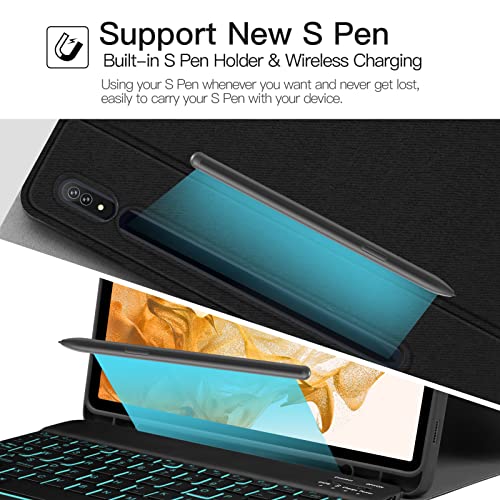
Can I charge the S Pen while it's in the case?

Yes, the case supports wireless charging for the S Pen, so you don't need to remove the case to charge it.

What is the battery life of the backlit keyboard?

The backlit keyboard features a long-lasting lithium-ion battery, allowing for extended use without frequent recharging.

Does the keyboard have shortcut keys?

Absolutely! The keyboard includes full shortcut keys for functions such as copy, paste, volume control, and more, enhancing your productivity.

Is the keyboard waterproof?

Yes, the keyboard is made with a high-quality waterproof conductive film, providing better functionality and durability.